Build and Kill Zombies Beginner Guide — First Hour Walkthrough
Build and Kill Zombies beginner guide: redeem the best starter codes, roll an engine first, mount a cheap support and bank your first run — the fastest path to a working car.
This Build and Kill Zombies beginner guide covers the first hour: the free stuff to claim, what to roll first, and the cheapest path from a bare plot to a car that survives its first zombie wave. The game's own tutorial handles the basics — your first two objectives are literally "Buy the Build Tool!" followed by "Open the Build menu" — so this page focuses on the decisions the tutorial does not make for you.
Step 1: Claim the Free Rewards First
Before spending anything, collect the freebies that skip early grinding:
- Redeem COMMUNITY in the Exclusive Shop — it grants 1,000 Cash plus a Small Engine and a Small Tank, which is most of a first drivable car. The full working list with rewards is on the codes page.
- Claim the free chest — the chest board near spawn reads "FREE CHEST / LIKE GAME AND JOIN GROUP". Like the game, join the Zombie Car Crusher group, and the chest pays out.
That starting bundle means your first rolls can target whatever the codes did not cover instead of everything at once.
Step 2: Roll an Engine First
The CAR PARTS roll machine is where cash becomes parts, and engines are the correct first target: the engine ladder starts at 1 in 3, so a few pulls nearly guarantee the Small Engine that makes the car actually move. At the roll station, use the SELECT CATEGORY picker to choose one category rather than rolling randomly.
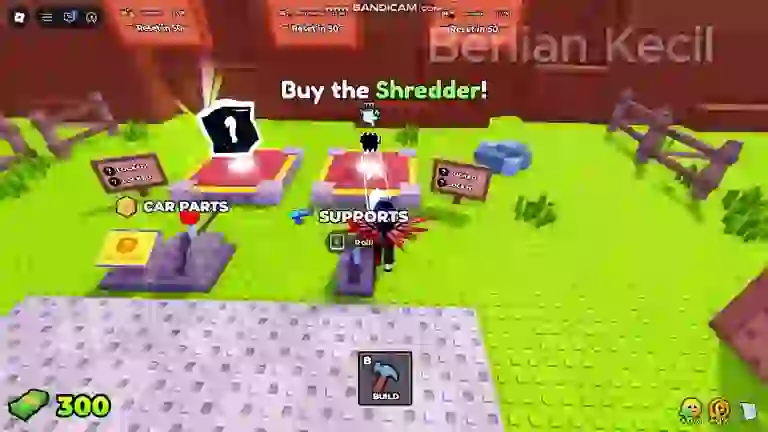
The full odds ladder per category — engines run 1 in 3 through 1 in 12,500 — is documented on the builds hub, and the roll odds calculator converts a ladder slot into the number of rolls you should expect to spend.
Step 3: Assemble a Working Car in Build Mode
Build Mode is where rolled parts become a vehicle. The interface splits into STRUCTURES, SUPPORTS and TURRETS tabs, with parts such as Wall, Ramp and Floor forming the chassis; placement uses E (Place), R (Rotate) and X (Cancel). The minimum viable car needs four things: an engine, wheels, a seat and fuel — the COMMUNITY code already covers two of the four.
Two beginner mistakes are common and cheap to avoid. First, do not save parts for a perfect build — a working car earning run income beats a half-finished dream garage. Second, mount at least one front support before your first real run: the Wooden Spike rolls at 1 in 3 and costs nothing else, and it clears the early zombie clusters that would otherwise shred an unarmed car.
Seen in footage · 2026-09-24Step 4: Bank Your First Run
Drive through the zombie waves as far as fuel allows — a Distance counter tracks progress with checkpoint markers, and both distance and kills convert into cash when the run ends. That payout is the engine of the whole game: it funds the next round of rolls, which build a better car, which earns more per run. Leaving the play area triggers an "Out of bounds!" warning instead of paying out, so stay on the battlefield.
Seen in footage · 2026-09-24Step 5: Compound with the Skill Tree
Early cash goes further in the skill tree than in more rolls. Luck II costs 250 and adds +20% Luck; Luck III costs 625 and adds another +25%. Better luck improves every roll you ever make afterwards, which is why the skills guide ranks Luck nodes above most weapon purchases for the first several thousand cash. The safest opening order: COMMUNITY code → engine rolls → one front support → first run → Luck II.
Beginner FAQ
What should I buy first in Build and Kill Zombies?
The Build Tool (the tutorial prompts it), then CAR PARTS rolls targeting engines — the starter engine sits at 1 in 3 odds. Skip weapon rolls until one front support is cheaper than the waves it prevents.
Do I need to spend Robux?
No. Codes, the free group chest and run income cover the whole early game. The shop sells Robux cash packs and a gamepass, but nothing in the first hours requires them.
How do I get a free engine?
Redeem the COMMUNITY code — it grants a Small Engine and a Small Tank alongside 1,000 Cash, no gameplay requirement. See the codes page for the current list.
Why did my run pay nothing?
Runs only pay while you are on the battlefield — leaving the play area triggers an out-of-bounds warning instead of a payout. Also check that fuel lasted the whole push; a dry tank ends the run wherever it is.
Next steps: wave survival, skills, how to play and the update log.