How to Play Build and Kill Zombies — Controls, Menus & Blueprints
How to play Build and Kill Zombies: every menu explained, Build Mode placement keys, the roll station system, blueprint spawning and run payouts for new players.
This how to play Build and Kill Zombies walkthrough maps the whole interface — every menu button, the Build Mode keys, the roll station system and the blueprint spawn flow — so nothing on screen is a mystery after your first session. The tutorial teaches the first two steps; this page covers everything it does not.
The Menu Map
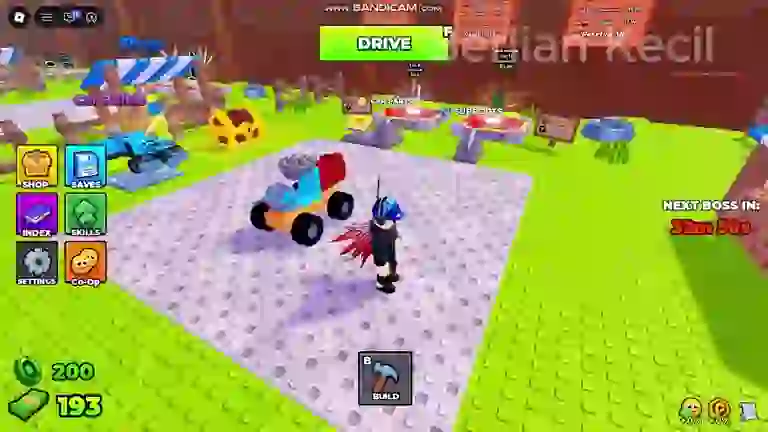
The left-side button column holds six menus, and each one matters weekly:
| Menu | What it does |
|---|---|
| SHOP | Robux cash packs, the Exclusive Shop and the Community Codes redeem box |
| SAVES | Saved vehicle builds you can reload instead of rebuilding from scratch |
| INDEX | The parts database — every category with its odds ladder and locked slots |
| SKILLS | The skill tree: Luck, Gold Roll and support-slot upgrades |
| SETTINGS | Standard options |
| Co-Op | Party options for building and driving together |
The INDEX deserves a habit: it shows each part category's odds ladder and marks uncollected slots as ???. A Gold Roll! popup occasionally interrupts a roll result — gold rolls pay out a higher-tier item and tie into the Unlock Gold Roll skill node.
Build Mode Controls
Build Mode is the welding bay where parts become a car. The panel splits into three tabs — STRUCTURES, SUPPORTS and TURRETS — with structural parts such as Wall, Ramp and Floor forming the chassis. Placement uses three keys:
- E — place the selected part
- R — rotate it
- X — cancel
Mounting logic is directional: contact weapons like the Wooden Spike sit on the front face where they hit zombies, while supports with area effects — the Flamethrower at 1 in 9 odds being the famous example — reward placement where the crowd actually is. The builds hub documents every part read so far with its odds and value.
The Roll Station System
Roll stations sit on the map labelled CAR PARTS and SUPPORTS, each showing a counter like "In 20 Rolls" next to a Locked marker — rolls unlock as you progress. At a station, the SELECT CATEGORY picker chooses which ladder you are pulling from, and each result popup shows the part with its odds and cash value. Engines run from 1 in 3 to 1 in 12,500 across ten slots — the full ladders and the roll odds calculator live on the builds hub.
Blueprints: Spawn Instead of Build
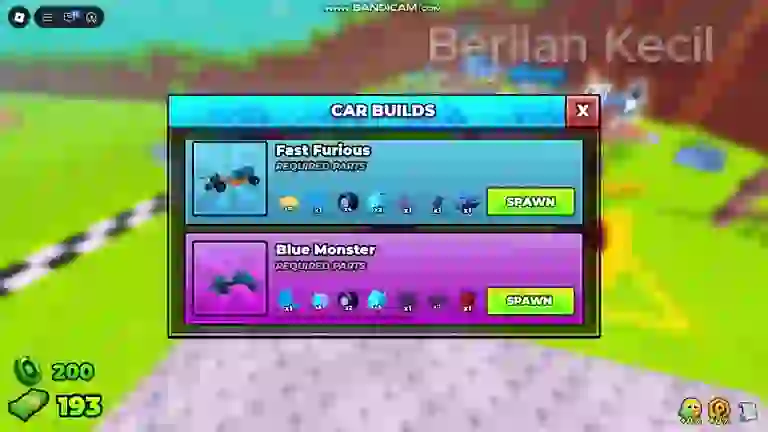
The Car Builds panel lists pre-designed vehicles such as Fast Furious and Blue Monster. Each blueprint shows its Required Parts as icon counts — x10, x1, x4 — and a green Spawn button instead of a cash price. If parts are missing, a Missing Parts panel lists exactly what you still need, with a coin top-up price per part if you would rather buy the gap than roll for it.
Blueprints are the bridge between rolling and building: they give you an exact shopping list, and every part on the list comes from the same roll machines. The SAVES menu then stores your own creations the same way.
Runs, Distance and Payouts
A run is the driving half of the game: push through zombie waves while a Distance counter climbs and checkpoint markers tick past, with an in-run timer alongside. Both distance and kills convert into cash at the end. Three practical rules:
- Fuel is the run timer — a dry tank ends the push wherever it is, so fuel parts are income parts.
- Stay in bounds — leaving the play area triggers an "Out of bounds! Return to the Battle Field!" warning with a RETURN button instead of a payout.
- Boss windows pay attention — a world sign reads "NEXT BOSS IN:" with a live countdown; boss fights bring a BOSS FIGHT health bar and interrupt ordinary driving (see the boss guide).
How to Play FAQ
Is Build and Kill Zombies free to play?
Yes — it is a free Roblox experience with optional Robux purchases (cash packs and a gamepass discount appeared in the September what's-new panel). Codes and run income cover the early game without spending.
Can I play Build and Kill Zombies with friends?
Yes. Servers seat up to five players, the Co-Op menu handles party options, and the Passenger Seat part lets another player ride your build.
What are the controls?
Build Mode uses E to place, R to rotate and X to cancel; driving is standard Roblox vehicle controls. The full menu map is in the table above.
Where do I see part odds?
In the game's INDEX menu — each category shows its odds ladder with uncollected slots as ???. Our builds hub mirrors the ladders that have been read from footage.
Continue with: beginner guide, waves, skills and the codes list.